 S3 Files
Connect to Backblaze B2
Backblaze B2 speaks the S3 protocol, and S3 Files connects to it with an application key: a keyID and an applicationKey. Once both are entered, S3 Files looks up the endpoint and region itself.
1. Create an application key
Sign in to Backblaze, open Application Keys and choose Add a New Application Key. Pick All or one bucket under Allow Access to Bucket(s), and Read and Write or Read Only. Copy both values right away, as Backblaze shows the applicationKey only once.
Your account's master application key doesn't work with the S3 API, so make a new one. More in Backblaze's guide to application keys.
2. Fill in the server
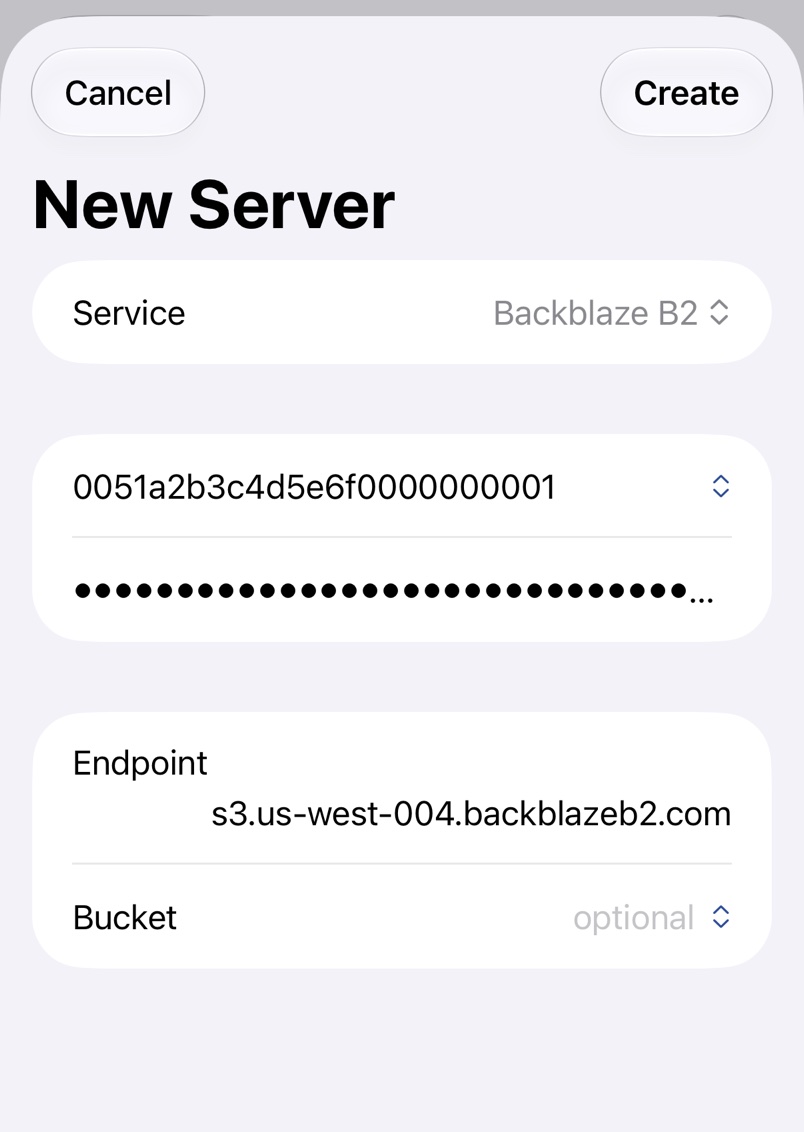
Pick Backblaze B2, paste the keyID into the first field (KeyID on a Mac) and the applicationKey into the second, and Endpoint fills in by itself. Pick the bucket with the chevron or type its name.
Troubleshooting
- Only Application Keys with access to all buckets can list available buckets. Type the bucket name instead.
- Public Read is not supported in this bucket. A private bucket refuses public files, but expiring links from Share Links work in any bucket.