 S3 Files
Connect to Cloudflare R2
R2 is Cloudflare's S3-compatible storage. S3 Files connects with the S3 credentials of an R2 API token and your Cloudflare account ID.
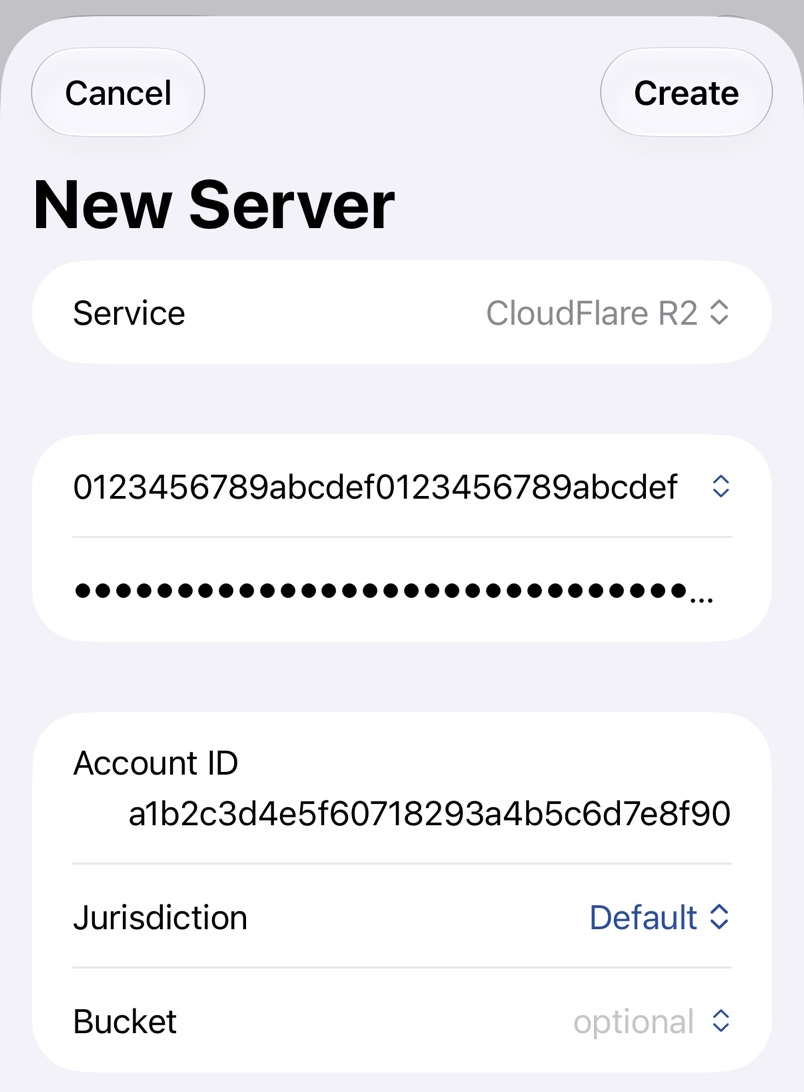
1. Create an R2 API token
In the Cloudflare dashboard, open R2 object storage → Overview, choose Manage next to API Tokens under Account Details, and create an account API token. Admin Read & Write lets S3 Files list your buckets; Object Read & Write can be limited to some buckets, but then you type the bucket name.
Copy both keys right away, as Cloudflare shows the secret only once; Cloudflare's guide to R2 API tokens has the details.
2. Find the account ID
The account ID is the 32 character hexadecimal string under Account Details on the same page, and the start of the endpoint shown with the token. Enter only the ID.
3. Fill in the server
Pick CloudFlare R2, paste the two keys and enter the ID in Account ID. Pick European Union (EU) under Jurisdiction only for a bucket created in the EU jurisdiction. Then pick the bucket with the chevron or type its name.
Troubleshooting
- API key needs at least Admin Read permissions to list available buckets. The token has Object permissions only, so type the bucket name.
- Access Denied for one bucket usually means an Object token limited to other buckets.
- An EU bucket can't be found while Jurisdiction is Default.