 S3 Files
Free and Pro
The free version of S3 Files works with one server: browse it in S3 Files, the Files app and Finder, and open, edit and upload its files.
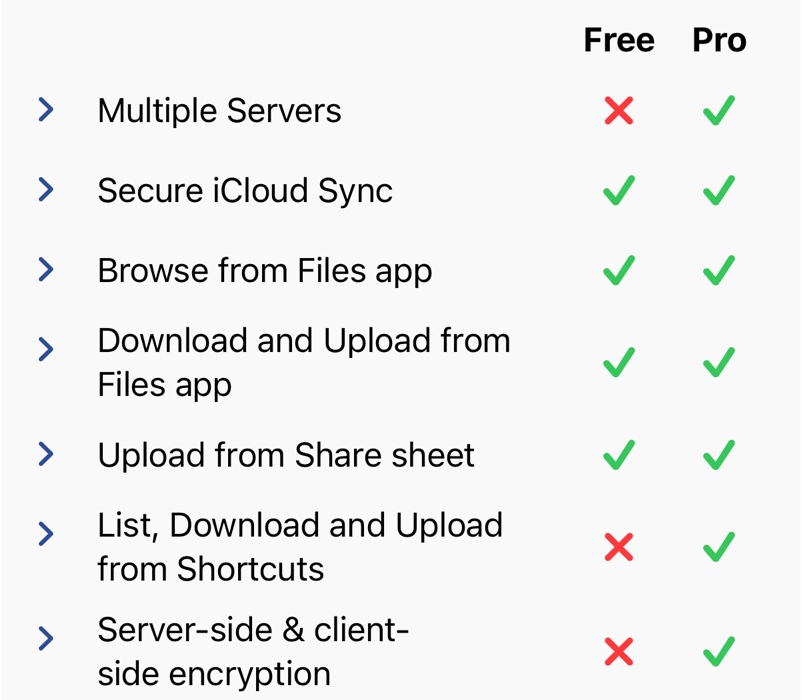
What Pro adds
- Any number of servers
- Shortcuts actions
- Folder Sync
- Share, upload and edit links
- Keep Downloaded on a Mac
- Encryption
- Earlier versions of files
- Listing every bucket in the account
Older installs
Older installs keep the free version they started with. If you installed S3 Files before the one-server limit, any number of servers are free, but downloading, uploading and changing files need Pro. Installs from before free servers had to name a bucket can still list every bucket.
Subscription or Lifetime Purchase
Open Pro Unlock in Settings and pick Monthly Subscription or Lifetime Purchase; the button reads Start Trial when there's a free trial. To switch to Lifetime Purchase, turn off the subscription's renewal first. Restore Purchases brings back a purchase made on another device or before a reinstall.
On all your devices
Pro is shared between iPhone, iPad and Mac, and iCloud Keychain syncs your server settings between them, end-to-end encrypted.