 S3 Files
Share Files with Expiring Links
A share link lets someone download one file from your bucket in a browser, without keys or an account. It stops working after the time you set, 12 hours unless you change it. A file anyone may read, through its Public Read permission or a bucket policy, gets its plain public address instead, which never expires.
Creating share links needs Pro, and they aren't offered on servers with an encryption key.
Making a link
- On iPhone and iPad, long-press a file in the Files app and choose Share Link.
- On a Mac, right-click a file in Finder and choose Copy Link, or Open Link to open it in your browser.
- In S3 Files, a file's menu in the browser has Copy Link.
How long links last
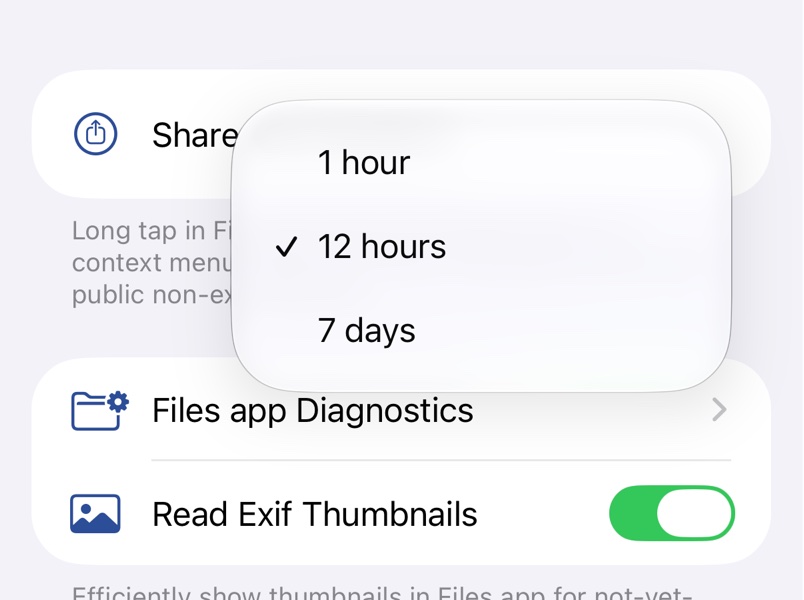
Choose 1 hour, 12 hours or 7 days under Share Link Duration in Settings on iPhone and iPad, or Share Link Expiration in the Finder tab of Settings on a Mac. Links made on an IAM Identity Center server stop sooner, when its short-lived credentials expire.
Links while uploading
When you upload by sharing files to S3 Files from another app, or with Quick Upload, Copy Share Link puts links on the clipboard once the upload finishes; Public Read there uploads the file as readable by anyone and copies its permanent address.
Many buckets refuse public files for security reasons making expiration mandatory.
Troubleshooting
- The link says the request has expired. Its time is up, so make a new one.
- The link says access is denied. The file was moved or deleted, or the keys that signed the link no longer reach it.