 S3 Files
Connect to MinIO and Garage
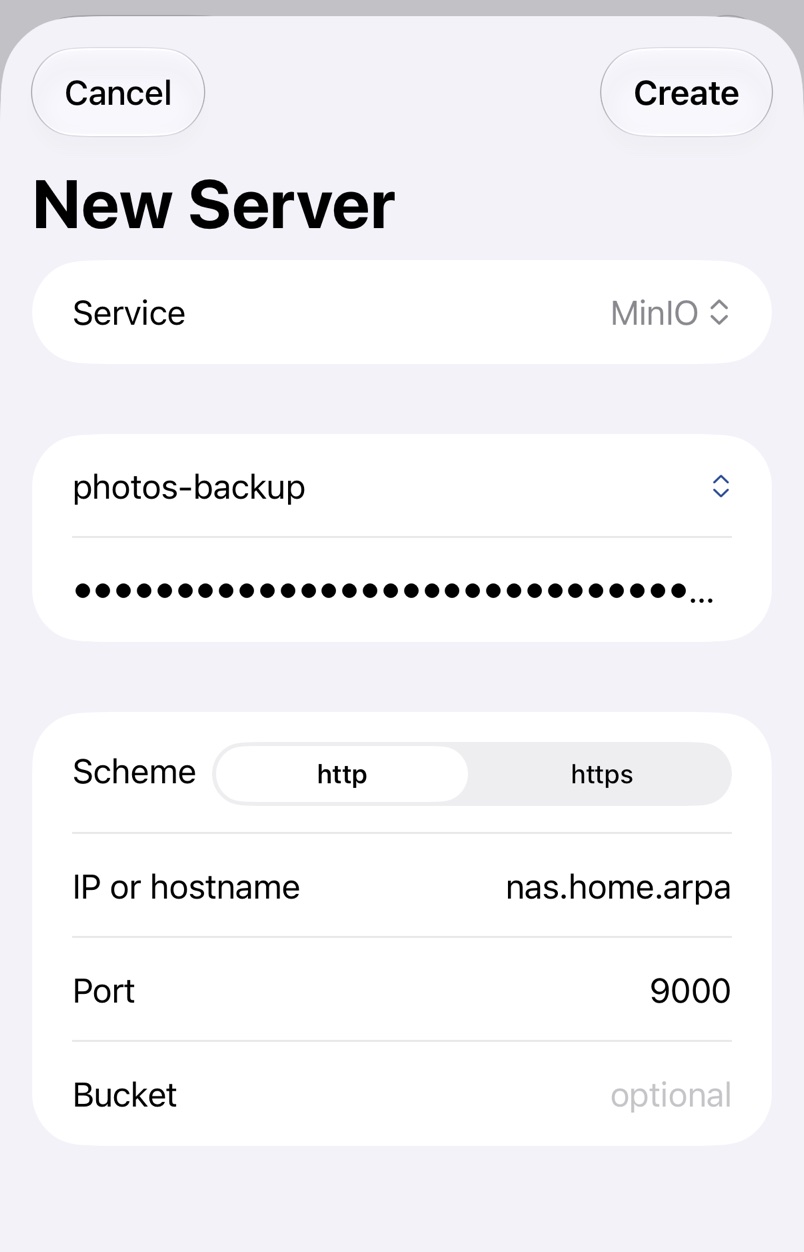
MinIO and Garage are S3 servers you run yourself, on a NAS, a home server or a rented machine. Create an access key on the server, then pick MinIO or Garage in New Server.
1. Create a key on the server
Make a key for S3 Files, ideally one that only reaches the buckets you want. On Garage:
garage key create s3files
garage bucket allow --read --write --owner example-bucket --key s3files
MinIO makes access keys in its console or with mc, as its documentation describes.
2. Fill in the server
- Scheme: http on your own network, https when the server has a certificate.
- IP or hostname: such as
192.168.1.20ornas.local, without scheme or port. - Port: starts at
9000for MinIO and3900for Garage. Clear it to use 80 or 443, as behind a reverse proxy. - Bucket: leave it empty to see every bucket the key may list.
Garage only accepts its own region, garage in its example configuration. If the test reports Authorization Header Malformed, enter the s3_region from your Garage configuration in Region in the server details.
Troubleshooting
- Untrusted Certificate for a server with a self-signed certificate. Compare the SHA256 fingerprint with the one on the server and tap Trust, and S3 Files remembers it.
- Local Network Access Required. Tap Open Settings and turn on Local Network for S3 Files.
- Could not connect to the server. Check that the server is running and the port is the S3 API port, not the web console.
- A server with the specified hostname could not be found. A
.localname only works on the same network; use the IP address, or a VPN such as Tailscale away from home. - To reach the server from the internet, use a port forward or a VPN, and https.